Friday, March 3, 2017

K8 (Kube) Package Manager - Helm

I see helm as analogous to  AWS Cloud Formation

https://github.com/kubernetes/helm

Helm is the package manager for kubenetes. It in-turn uses kubenetes charts .

Helm is a tool for managing Kubernetes charts. Charts are packages of pre-configured Kubernetes resources.
Use Helm to...


  • Find and use popular software packaged as Kubernetes charts
  • Share your own applications as Kubernetes charts
  • Create reproducible builds of your Kubernetes applications
  • Intelligently manage your Kubernetes manifest files
  • Manage releases of Helm packages


Helm is the tool to load charts into K8 for application deployment

Thursday, March 2, 2017

WTF is "Open Source Core"

I recently came across this term and it sounds cool and practical to me.
Thought of sharing it here, as i suddenly realized i have this in my screen all over...

Example : Look at https://www.influxdata.com/products/ , formerly influx DB.

They have real good products (influxcloud, influxEnterprise, TICK stack), inturn all of these are just one "A Real-Time Monitoring Solution"

In data center we host tons of application and we need a true solution for monitoring, there are tons of monitoring solutions datadog, new relic, etc... but all are closed products.

The power of "Open Source Core" is the whole complex product is open sourced ( githubbed )
, but the niche feature to take it to enterprise or integrate will be the monetizing way.

That is , in this example Influx Enterprise is the Monetizing product.

Another example : Hashicorp
https://www.hashicorp.com/

Famously called "Hashi-stack", open sourced all their core complex products.
Vagrant, Packer, Vault, Consul, Terraform. But their enterprise version and another niche product atlas is their monetizing product.

https://overcast.fm/+HZUc5QQ4k/35:07

Mesosphere DC/OS installation

I am playing around with DC/OS and tried to install it on GCE ( Google Cloud Engine )

I blindly followed https://dcos.io/docs/1.8/administration/installing/cloud/gce/#configure

and saw stars at the end ( well, spinning around my head ) .

Not so good documentation, end result : "nothing works"

I was hoping i will improve this documentation with my experience of installing in GCE, but i failed miserably , could not achieve what i want to do.

Ok, what really happened

I followed the instruction in DC/OS documentation but could not get the DC/OS up and running.

1. https://dcos.io/docs/1.8/administration/installing/cloud/gce/#bootstrap :
Easy and got this working
2. https://dcos.io/docs/1.8/administration/installing/cloud/gce/#install :
These are ansible powered and calls GCE API to provision a master0 node and then agent-nodes, all works fine with slight tweek to ansible, it did not run the first time as documented.
3. https://dcos.io/docs/1.8/administration/installing/cloud/gce/#configure : Failed

I wanted to be sure if i really installed DC/OS stack and was i successful?
I could not see the mesos, marathon or DCOS. Err:FAILED.

All i have done so far is bring up 3 VMs in my GCE.

I wish this document gets better and a cleaner support ....


BTW : A good pod to listen to https://overcast.fm/+I_rT72mY/41:07

Wednesday, March 1, 2017

How to run graylog cluster in GKE(Google Container Engine)

With reference to another article i wrote earlier on how to run graylog cluster in kubenetes here ( http://beeyeas.blogspot.com/2017/02/how-to-run-graylog-cluster-in-kubernetes.html) , it was the way to run graylog ( mongo, elastic and graylog server) to-gether in one single container instance in minikube.

Here i take another attempt to run micro-services container of mongodb, elastic-search and graylog2 in google cloud platform - google container engine( GKE )

Step1 : See here (http://beeyeas.blogspot.com/2017/02/gke-google-container-engine.html) , how to bring up GKE ( kubenetes instance )

I assume, you followed the instructions here correctly and have "kubectl" CLI configured correctly to point to your gcloud GKE instance.
Make sure you can access kubenetes dashboard , for which you have to proxy service 

#kubectl proxy

Step 2 : get the kubenetes service and deployment files here ( https://github.com/beeyeas/graylog-kube ), clone repo

Step 3 : Create mongo, elasticsearch, graylog
#kubectl create -f mongo-service.yaml,mongo-deployment.yaml
#kubectl create -f elasticsearch-deployment.yaml,elasticsearch-service.yaml
#kubectl create -f graylog-deployment.yaml,graylog-service.yaml

Step 4 : forward graylog UI to local 19000 port
#kubectl port-forward graylog-2041601814-5qnbc 9000:9000

Step 5 : Verify if all services are up
#kubectl get services
NAME            CLUSTER-IP    EXTERNAL-IP   PORT(S)              AGE
elasticsearch   None          <none>        55555/TCP            1h
graylog         10.3.248.24   <none>        9000/TCP,12201/TCP   1h
kubernetes      10.3.240.1    <none>        443/TCP              1d

mongo           None          <none>        55555/TCP            1h

NOTE: Access localhost:9000 for graylog UI

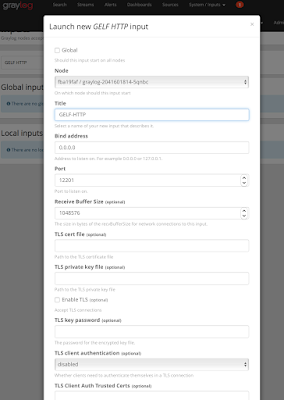
Step 6 : Graylog UI is empty and do not have any logs to index or show , i have exposed port number 12201. Create a port forward for graylog input GELF HTTP
Make sure you got this screen configured in graylog, configurig GELF-HTTP in graylog


#kubectl port-forward graylog-2041601814-5qnbc 12201:12201

Step 7 : Now we can pump some test log statements into graylog from localhost

for i in {1..100000}; do curl -XPOST 127.0.0.1:12201/gelf -p0 -d '{"short_message":"Hello there", "host":"example.org", "facility":"test", "_foo":"bar"}'; done


After step 7 where you pump the logs, see if logs are showing up in the graylog UI


Tuesday, February 28, 2017

GKE - Google Container Engine

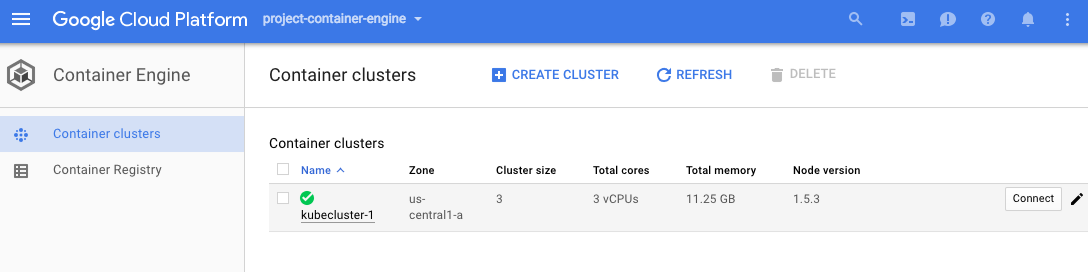
Google Container (with K) Engine aka GKE is a container solution from google cloud platform (GCP)


How to start with GKE?
  1. I assume you have a cloud.google.com account signed up with your gmail account, need credit card (but $300 credit) for 60 days
  2. https://cloud.google.com/container-engine/
  3. View My Console 
  4. Remember to download "gcloud" https://cloud.google.com/sdk/docs/quickstart-mac-os-x
  5. My cluster is called "kubecluster-1"
  6. Once i have gcloud init and installed , set up the auth by gcloud auth list      
  7. Sample kubectl command shows it works
#kubectl get namespaces
NAME          STATUS    AGE
default       Active    1h
kube-system   Active    1h

voila, kube is up


Thursday, February 23, 2017

How to run graylog cluster in kubernetes

Graylog is the splunk equivalent for log collection, indexing , search analysis function.


I am playing around with it little bit and seeing the functions, so i need a quick installed version in 

  1. If OS X install minikube https://kubernetes.io/docs/getting-started-guides/minikube/#minikube-features
  2. Running graylog cluster : 
    • #kubectl run graylog --image=graylog2/allinone --port=9000
  3. Forward TCP:9000 to show the graylog UI 
    • #kubectl port-forward graylog-2473246842-b6rhg 9000 &
  4. To view UI : point your browser to : http://127.0.0.1:9000
    • admin/admin is the default username and password
  5. To view logs of graylog pods : 
    • #kubectl get pods ( this should give an output of running graylog container instance )
    • #kubectl logs graylog-2473246842-b6rhg


Thursday, February 16, 2017

Data Analytics / Data Pipeline PANKCAKE


Working on a goal to bring this up in simple kubenetes cluster.

minikube ( playgroud for kubernetes )

Exercise Goal : Bring up minikube ( kubernetes ) in local VM


Bringing up minikube (kubenetes) + weave scope ( a monitoring stack ) in local laptop
#minikube addons list
- registry-creds: disabled
- addon-manager: enabled
- dashboard: enabled
- kube-dns: enabled
- heapster: disabled
- ingress: disabled

I could not successfully bring in weave, i like it better graphically, but all i got it heapster for now

#minikube addons enable heapster 
heapster was successfully enabled

Kubectl Drain
#kubectl drain minikube —force
This node minikube will be drained and all services will be stopped by force, there is an option to provide grace time.

To recover a node which has drained
#kubectl uncordon minikube

Heapster – the influx , graphana, dashboard for kube

#minikube addons open heapster 

This should open a browser and graphana showing pods, cluster

Monday, February 13, 2017

Serverless ( AWS : Lambda / GCP:Cloud Functions / Azure:Functions )

Serverless 

I am writing this as i exploring the infrastructure and landscape of serverless in early 2017.
Lately i see the adoption to serverless is drastic and really see the need for it every month i have to check the bills.

I was telling people that serverless is the solution to big fat bills from cloud providers. In turn what really that means is serverless is the way of standing up applications, databases, ETL jobs , web servers etc... in simple and quick way , where the huge operational cost of standing up virtual machines with operating system is not needed. Indeed the application runs as simple function instance.

AWS : Lamba
GCP : Cloud Functions
Azure : Functions

Are the available famous serverless architectures.

Marriage of containers and serverless

as i write here, there are lots of momentum on container (docker) supporting the serverless infrastructure.


Hypernetes
Hypernetes is a secure, multi-tenant Kubernetes distro. Simply put,
Hypernetes = Bare-metal + Hyper + Kubernetes + KeyStone + Cinder + Neutron.
https://github.com/hyperhq/hypernetes

Hyper.sh
Reference : https://www.hyper.sh/

Friday, February 10, 2017

Tricks using GCP for begginers

Tracking Some gcloud commands


  1. I see the application login authentication need your browser to use the google id and password.

This creates a file ~/.kube/config and stores the downloaded user information session in here.

Launch kubectl proxy or #kubectl cluster-info this uses this application login details to function.

gcloud auth application-default login

bee-social